Google Search Console Guide for Himachal Websites: The 2026 Beginner's Handbook to Monitoring & Improving SEO
You've built a beautiful website for your Manali hotel, your Dharamshala café, or your Bir Billing paragliding company. You're waiting for the bookings to roll in. But how do you know if Google has even discovered your pages? Are you showing up for the search terms that matter? Are there hidden errors silently hurting your rankings?
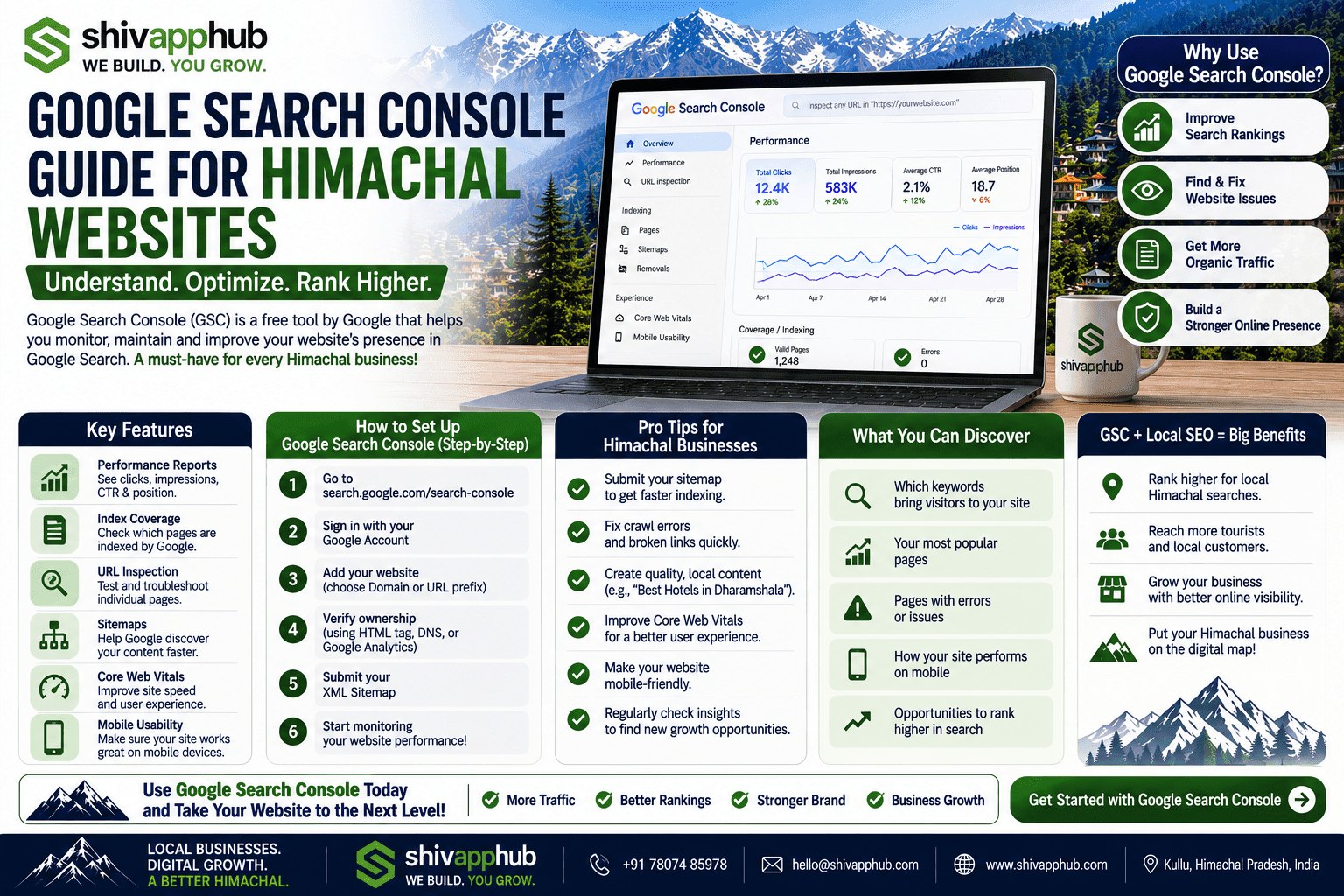
Google Search Console (GSC) answers these questions. It's a completely free tool from Google that acts as a direct communication channel between your website and the search engine. It tells you what keywords you're ranking for, which pages are getting clicks, where errors exist that prevent indexing, and how your site performs on mobile. For Himachal's competitive tourism market, ignoring GSC is like running a hotel with the front door locked.
At ShivAppHub, we regularly diagnose and fix critical SEO issues for our clients using GSC – often leading to a 20–40% increase in organic clicks within weeks. This guide walks you through every step, tailored specifically for small and growing businesses in the hills.
🔍 What is Google Search Console and Why It's a Lifeline for Himachal Businesses
Google Search Console is a free web service that lets you monitor, maintain, and troubleshoot your site's presence in Google Search results. You don't need a paid subscription, and you don't need to be an SEO expert. If you have a website, you need GSC.
For a hotel, homestay, or tour operator, GSC reveals:
In a destination like Himachal, where many businesses are small and seasonal, GSC levels the playing field. It gives you the same insights that large hotel chains pay SEO agencies for.
✅ Step‑by‑Step: How to Set Up Google Search Console for Your Website
Follow these six steps to get started and unlock your data.
1. Add Your Website Property and Verify Ownership
Go to [search.google.com/search-console](https://search.google.com/search-console) and sign in with your Google account. Click "Add property" and choose "URL prefix" (enter your full website address, e.g., `https://www.yourhotel.com`).
Google will prompt you to verify ownership. The easiest methods:
We typically use the DNS method for clients because it's permanent and doesn't break.
2. Submit Your XML Sitemap
A sitemap is a file that lists all important pages on your site. Submitting it tells Google exactly what to crawl and index. Most websites automatically generate one at `yourwebsite.com/sitemap.xml` (or `/sitemap_index.xml` for WordPress).
In GSC, go to Indexing > Sitemaps. Enter the sitemap URL (e.g., `sitemap.xml`) and click Submit. Google will process it, and you'll see a status. Check back after a day or two to ensure it was successful; any errors will be listed.
3. Check the Index Coverage Report
This is your first priority after verification. Go to Indexing > Pages. You'll see a chart of indexed vs. not indexed pages. Click into the "Not indexed" list. Common reasons for Himachal sites:
Resolve all errors where possible. A clean indexation report is foundational.
4. Explore the Performance Report – Your Goldmine of Insights
Click "Performance" in the left menu. You'll see four metrics: Total clicks, Total impressions, Average CTR, and Average position. Set the date range to the last 3 months.
Scroll down to the Queries table. This is the list of actual search terms that brought users to your site. Look for:
5. Use the URL Inspection Tool
Type any page URL into the inspection field at the top. This tool shows you the page's current index status, crawl date, canonical URL, and any structured data detected. If you've recently updated a page, you can click "Request Indexing" to ask Google to recrawl it – a critical feature for seasonal offers or new room additions. Within a few days, your changes can appear in search results.
6. Regularly Check the Mobile Usability and Core Web Vitals Reports
Under Experience, you'll find two vital reports:
📈 Key Features to Leverage for Ongoing SEO Growth
Beyond the basics, these GSC tools help you outpace competitors.
🏔️ Common GSC Issues We Fix for Himachal Businesses (and How to Solve Them)
💡 Real Example: How a Shimla Hotel Increased Organic Clicks by 35% Using Only GSC Data
A heritage hotel near The Ridge had a functioning website but didn't actively monitor GSC. When we gained access, we found:
We:
1. Redirected old gallery URLs to the new gallery.
2. Rewrote the meta description for the high‑impression query to: “Stay in a 120‑year‑old heritage hotel 2 mins from Shimla Mall. Antique rooms, valley views, and a legendary breakfast. Check availability today.”
3. Fixed the robots.txt file and submitted the previously blocked room pages for indexing.
Within 6 weeks, clicks from organic search rose 35%, and the heritage hotel query moved from #5 to #2, tripling clicks from that term alone. The owner now checks GSC weekly like a hawk.
🚀 Get a Free Google Search Console Audit & Setup from ShivAppHub
GSC is only powerful if you use it correctly. We help Himachal businesses set up, verify, and interpret their Search Console data, turning raw numbers into actionable SEO strategies.
👉 [Book a free GSC audit and setup session](/contact). We'll help you verify your property, submit your sitemap, identify critical errors, and show you 5 quick wins to boost your search presence – no cost, no obligation. Let's make sure Google sees your site the way your guests see the mountains.
*Watch our vlog where we walk through a real GSC account of a Dharamshala homestay and uncover over 100 unindexed pages – and fix them live!*